Any Linux user will tell you that audio is a nightmare. While Windows and macOS users have spent the last two decades1 benefiting from unified, vertically integrated audio (CoreAudio, WASAPI), Linux users have to deal with every distribution managing audio slightly differently, every new laptop requiring a new open-source driver to be acquired, and every year, a newcomer entering the field who thinks their new sound server will fix everything.
The complexity comes from a fundamental architectural challenge - how do you allow multiple applications to share a single piece of hardware (your sound card) without introducing massive lag or stability issues?
Nowadays, we’ve reached a relatively stable era with the widespread adoption of PipeWire2 in the late 2010s and early 2020s3, but to understand where PipeWire came from, we have to look at the gradual revolution which attempted, in various forms of success, to fix the Linux audio problem decades ago.
ALSA (Advanced Linux Sound Architecture)
- Layer: Kernel
- Focus: Hardware Drivers
- Mixing: Hard (dmix)
- Hotplugging: Bad
PulseAudio
- Layer: Sound Server
- Focus: Desktop Ease
- Mixing: Automatic (software)
- Hotplugging: Good
JACK
- Layer: Sound Server
- Focus: Low Latency
- Mixing: Manual (Graph)
- Hotplugging: Bad
PipeWire
- Layer: Multimedia Framework
- Focus: Unified Stability
- Mixing: Automatic + Graph
- Hotplugging: Great
The Prehistoric Era: OSS
Before we even get to the modern stack, it helps to understand that the “never-ending cycle” of audio servers is a Linux tradition. Before the current foundation existed, there was OSS (Open Sound System). It was the original UNIX sound system and was the standard in the Linux kernel throughout the 1990s.
It was eventually deprecated because its creators made it proprietary in 19984, which forced the open-source Linux community to scramble and build a replacement from scratch. That replacement was ALSA - Advanced Linux Sound Architecture.
We start again with ALSA
ALSA is a kernel-level framework which talks directly to the hardware (your sound card).
In the early days (and still technically nowadays), ALSA followed a strict rule of “one pipe, one process”. If your music player was using the audio ‘pipe’, your web browser was locked out. You wouldn’t be able to hear a notification sound if your sound card was occupied with playing some Radiohead. After various attempted framework-level solutions5, collectives of developers began to build a sprawling and fragile scaffolding of pipes on top of ALSA.
Enter PulseAudio
PulseAudio entered the stage as an ambitious project which tried to fix the ‘one user, one pipe’ problem6. It acted as a middleman, standing in front of ALSA, accepting audio from every app, mixing it together, and then shoving it into the ALSA pipe, pretending it was all one audio stream7.
On paper, PulseAudio was a revolution. In practice, for at least the first five years, it was a thorn for everybody who used a Linux desktop. It was famous for stuttering, high CPU usage, and the dreaded Internal Error that would leave your system entirely mute until you gave it a full reboot8. Sometimes, if you killed PulseAudio after it bugged out, your sound card would be overwhelmed with every queued audio event, and you would be gifted with a loud SCRMZMNEKEJEIOWJSANNSDMN before you reached for the power button. Another key problem was it would often ‘hang’, which is where a program stops responding, which would often be caused by resource overloading or crashing - but this would often block other programs from running9.
Glitch-Free Architecture
Admittedly, these were early days for PulseAudio - and many bug reports and patches were submitted over the years10 11 which improved the experience massively for the average user12. The PulseAudio developers hit back at criticism, claiming that it was only natural that new software released to so many people at once would result in many bugs being found13, especially such complex software as a sound server. The developer, Lennart Poettering, even developed a ‘Glitch-Free’ version of PulseAudio14. Yes, all software should be glitch-free, you say - a ‘glitch’ in terms of a sound server is a moment where the CPU is busy and the sound card has a moment where the audio stream is interrupted - you may have heard this when your speakers go pop or a click or a brief moment of silence. PulseAudio, as of 0.9.11 in 200814, moved from a simple push system to a smart timer system.
Historically, audio worked in ‘fragments’, scheduled via hardware Interrupt Requests (IRQs). The playback buffer is divided into a fixed number of ‘fragments’. The sound card plays one fragment, and then sends an interrupt to the CPU to request the next one. The interrupt interval T_int can be defined as buffer_size / (number_fragments * rate). This results in a significant trade-off - to achieve low latency, you have to use smaller and smaller fragments, which increases the number of interrupts per second, forcing the CPU to wake up more frequently and consume more power15. Poettering’s ‘glitch-free’ model replaces hardware interrupts with high-resolution system timers14. Instead of the sound card asking for data when it’s done, the audio server (PulseAudio in this case) proactively schedules CPU wakeups based off the system clock.
The system configures your sound card with the largest possible buffer (even up to 2 seconds). This provides a massive safety margin for any potential CPU scheduling delays. PulseAudio calculated the ‘time-to-empty’ based on the current playback position, and scheduled a wakeup 10ms before the buffer is projected to empty. If a buffer underrun15 occurs, the system will also dynamically increase the safety margin it assigned itself to prevent future glitches, essentially learning how jittery your system typically is, and adapting to it.
Now, you may think that a 2-second buffer would result in 2 seconds of latency in the case of a dropout. However, Glitch-Free architecture allowed for zero-latency interaction via something called buffer rewriting. Whenever a user interacted with the audio (ie hitting pause, or playing a new sound), the server would recalculate exactly which samples have not yet been processed, rewrite the samples in-place, and re-align the buffer to request new data dynamically.
This was a hugely impactful update and moved away from static, hardware-defined timing to dynamic, software-defined scheduling, which improved PulseAudio’s power efficiency (fewer CPU wakeups) while also improving the ability to react to user input with lower latency. These fixes worked, but also introduced a multitude of new bugs and made it less stable overall.
JACK
While the average user struggled with Pulse, audio professionals opted for JACK.
JACK built on top of ALSA, to create an experience where the most important thing was zero latency. In JACK, every app is forced to stay in perfect lock-step. If you have a digital guitar pedal and your recording software open, JACK will ensure they are synced down to the microsecond. It allows you to use ‘Patch Cables’ - you can literally route the audio out of one app and into another16. JACK aimed to prevent xruns - essentially buffer underflows, which created what we talked about before - ‘glitches’, or pops.
The main problem with JACK was that it was exclusive. It required a real-time kernel, and if you started up JACK to record some music, it would often ‘kick’ PulseAudio off the soundcard, meaning you couldn’t watch YouTube while trying to use your recording software.
But while JACK was inconvenient for daily use, it was vital for people who worked with audio professionally17. Paul Davis, the creator of JACK, is also the creator of Ardour, a free and very popular open-source ‘digital audio workstation’ (or DAW). Older versions of Ardour even required you to use JACK18, but modern Ardour works with all sound servers (like PipeWire, which we will get onto soon!)

Finally, PipeWire
The reason we talk about all of this in the past tense is thanks to the introduction of PipeWire in 2017. As you can read more about in the 2025 Linux Audio Conference, PipeWire has effectively ‘won’ the audio battle because it is so adaptable19.
PipeWire, originally called Pinos, was actually created to fix video, not audio. With the gradual shift to the Wayland display server (from X11), sharing screens and video suddenly became a problem. Pinos was built to route video streams securely between sandboxed apps. Because audio and video naturally need tight synchronisation, the developer Wim Taymans realised the framework he built for video was perfectly suited to replace PulseAudio and JACK20.
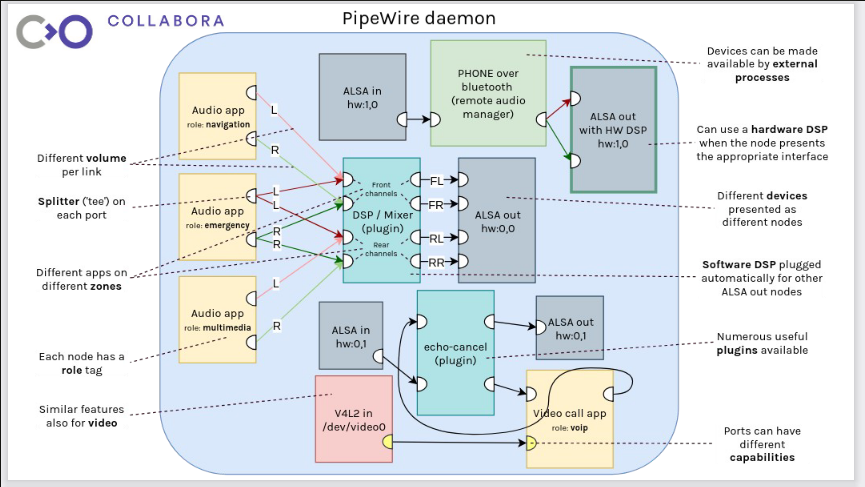
PipeWire acts as a single, unified connector. It has a PulseAudio-compatible interface for your browser and all old platforms, a JACK-compatible interface for your music production software, and it talks to ALSA using modern high-speed logic. It also helps massively with video/audio synchronisation, which you can read more about from the original creator, Wim Taymans21.
Another massive win for PipeWire was finally waking up from the Bluetooth nightmare. PulseAudio historically struggled heavily with modern Bluetooth audio. Getting high-quality codecs (like LDAC or aptX) working without stuttering often required users to install third-party modules or hack configuration files. PipeWire effectively solved Linux Bluetooth audio overnight, supporting all modern codecs out of the box with zero configuration22. For the average user, this alone was enough to make the switch.
PulseAudio was also a security nightmare on Linux for Flatpaks. Flatpaks are essentially ‘sandboxed’ apps, and they are a popular way to distribute apps on Linux if they don’t need system-wide access or permissions. PulseAudio tended to mess this up by blurring the line between system and apps - PipeWire uses a session manager (like WirePlumber)23 to handle routing logic, and a ‘portal’ system (called XDG Portal)24 to ensure sandboxed Flatpaks can’t access your mic without permission - which finally fits modern Linux security models25. PipeWire can also switch from ‘power-saving mode’ (a la PulseAudio) to a more high-performance and low-latency mode (JACK style) on the fly, depending on what devices you have plugged in and which programs you have open.
PipeWire adopted JACK’s graph-based approach - it essentially took the ‘everything is a node’ architecture from JACK that allowed users to connect inputs to outputs, and added the stability and adaptability to PulseAudio to make the best system we have today.
The End
For the first time in desktop Linux history, the audio stack is boring - and that is a compliment. I no longer have to choose between PulseAudio or JACK - I can have both. Today, I can open up Ardour to record a drum track, hop on a Discord call, and stream a YouTube tutorial, all at the same time.
-
WASAPI was only introduced in Windows Vista (2006). Before that, Windows audio was actually also chaotic, crash-prone, and suffered from terrible latency. ↩
-
Pipewire was released in 2018 https://archive.fosdem.org/2019/schedule/event/pipewire/ ↩
-
In 2023: https://www.phoronix.com/news/PipeWire-1.0-Released ↩
-
https://wiki.freebsd.org/Sound. OSS was later put back into the open-source world in around 2008 ↩
-
While ALSA eventually added a software mixer called
dmix, it was difficult to configure and lacked the flexibility required for a modern desktop. ↩ -
In 2006: https://0pointer.net/blog/projects/pulse-release.html ↩
-
PulseAudio was created by Lennart Poettering, the same developer behind the equally controversial
systemd. ↩ -
Jeffrey Stedfast wrote extensive criticisms of PulseAudio in 2008. https://jeffreystedfast.blogspot.com/2008/06/pulseaudio-solution-in-search-of.html ↩
-
https://jeffreystedfast.blogspot.com/2008/07/pulseaudio-again.html ↩
-
https://jeffreystedfast.blogspot.com/2008/07/pulseaudio-i-told-you-so.html ↩
-
Also called timer-based audio scheduling, it was released in 2008: https://0pointer.de/blog/projects/pulse-glitch-free.html ↩ ↩2 ↩3
-
When the sound drops out, this is called a buffer underrun or a ‘dropout’. https://en.wikipedia.org/wiki/Circular_buffer ↩ ↩2
-
The JACK FAQ - https://jackaudio.org ↩
-
https://www.linux-magazine.com/content/download/63041/486886/version/1/file/JACK_Audio_Server.pdf ↩
-
https://discourse.ardour.org/t/new-system-configuration-why-do-i-need-jack-and-other-questions/109521 ↩
-
https://hackaday.com/2021/06/23/pipewire-the-newest-audio-kid-on-the-linux-block/ ↩
-
https://blogs.gnome.org/uraeus/2017/09/19/launching-pipewire/ ↩
-
https://wiki.archlinux.org/title/XDG_Desktop_Portal ↩